URL Structure for Maximum SEO Impact: The Simple Setup Every New Blogger Needs
When you are just starting out, creating your URL structure for maximum SEO impact sounds technical and intimidating, but it’s actually one of the easiest things you’ll set up on your blog.
And it matters way more than you’d think.
Your URL is basically the web address for each post you write. That’s the text that shows up in the browser bar at the top when someone’s reading your content.
Most new bloggers don’t even think about URLs. WordPress creates them automatically, you hit publish, and you move on with your day.
That was me with my first blog. I let WordPress do whatever it wanted, which meant I had URLs that looked like random computer code mixed with my entire post title.
I didn’t realize that was costing me traffic. I had no idea.
I didn’t understand that Google reads your URLs to figure out what your posts are about.
A messy URL makes Google’s job harder.
A clean URL makes it easier.
And when you make Google’s job easier, you might even rank better.
What Is a URL Structure?
Let’s start super basic.
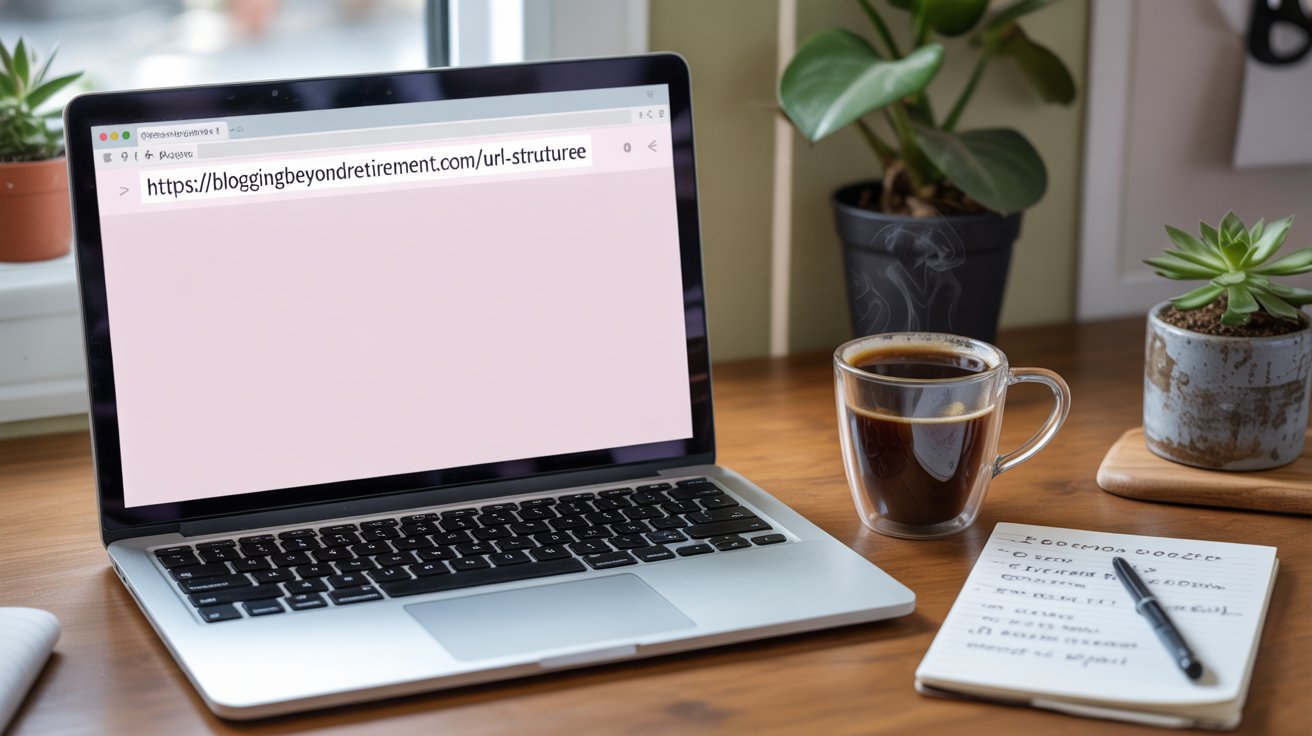
Your URL is the full web address. Like: bloggingbeyondretirement.com/seo-for-beginners
The “URL structure” is the pattern you use for all your URLs across your entire blog.
Some bloggers have dates in their URLs. Some have category names. Some have their entire post title crammed in there.
And some keep it simple with a short, clear description of what the post covers.
Your URL structure is one of those things that seem tiny but add up over hundreds of posts. Get it right from the start and you never have to think about it again.
Why Does Google Actually Care About My URLs?
Search engines use your URLs as clues about your content before they even open the page.
Think about it. Before Google reads your post, it’s already looking at the web address. A URL like “/wordpress-tips-beginners” tells Google exactly what that page covers.
A URL like “/?p=847” tells Google absolutely nothing.
This matters for your search engine ranking because URLs are one of many signals Google uses to match content with what people are searching for.
And here’s what people don’t talk about enough: readers care about URLs too.
When someone sees your link shared on Facebook or in an email, they glance at the URL before they click. A clear, readable URL builds trust. A weird, messy URL looks sketchy or spammy.
URL readability matters because you want people to actually click your links when they see them.
What Makes a Good URL for Blog Posts?
Good URLs are short, clear, and include your main keyword.
That’s it. Don’t overthink this.
Let’s say you’re writing a post about choosing a blog niche. Your URL should be something like:
/choosing-blog-niche
Not this:
/2024/12/26/the-ultimate-complete-guide-to-choosing-the-perfect-blog-niche-for-beginners
See the difference? The first one gets right to the point. The second one is trying way too hard and gets cut off in search results anyway.
For SEO-friendly URLs, use hyphens between words. Search engines read hyphens as spaces, so “blog-niche” works perfectly. “blogniche” or “blog_niche” doesn’t register the same way.
Keep everything lowercase. WordPress might let you use capital letters, but they can cause weird technical issues down the road. Stick with lowercase and save yourself the headache.
Skip the extra filler words like “the” and “and” and “for.” They make your URL longer without helping anything. Your goal is URL optimization, not stuffing every possible word in there.
How Do I Set This Up in WordPress?
WordPress makes this way easier than you’d think.
Before you publish any posts, go to your WordPress dashboard. Click on Settings in the left sidebar, then click Permalinks.
You’ll see a bunch of options. They probably all look confusing if this is your first time seeing them.
Choose “Post name.” That’s the one you want for clean site architecture.
This permalink setting makes your URLs simple and readable. They’ll be your domain name plus whatever you decide to put in the URL field when you write a post.
Once you select “Post name” and click Save Changes, you’re basically done with the technical setup. That’s it. You never have to mess with these settings again.
This is your foundation for good URL structure guidelines. Set it once, forget about it, and move on.
What About When I’m Writing a Post?
Every time you write a new post, WordPress automatically creates a URL from your title.
You should almost always edit that automatic URL to make it shorter. And yes, sometimes I forget editing this too.
Your title might be: “5 Mistakes New Bloggers Make That Kill Their Traffic”
WordPress will try to make your URL: /5-mistakes-new-bloggers-make-that-kill-their-traffic
That’s way too long.
Edit it down to: /new-blogger-mistakes
That’s so much better. It’s short, clear, and includes your keyword.
Here’s how to change it in WordPress:
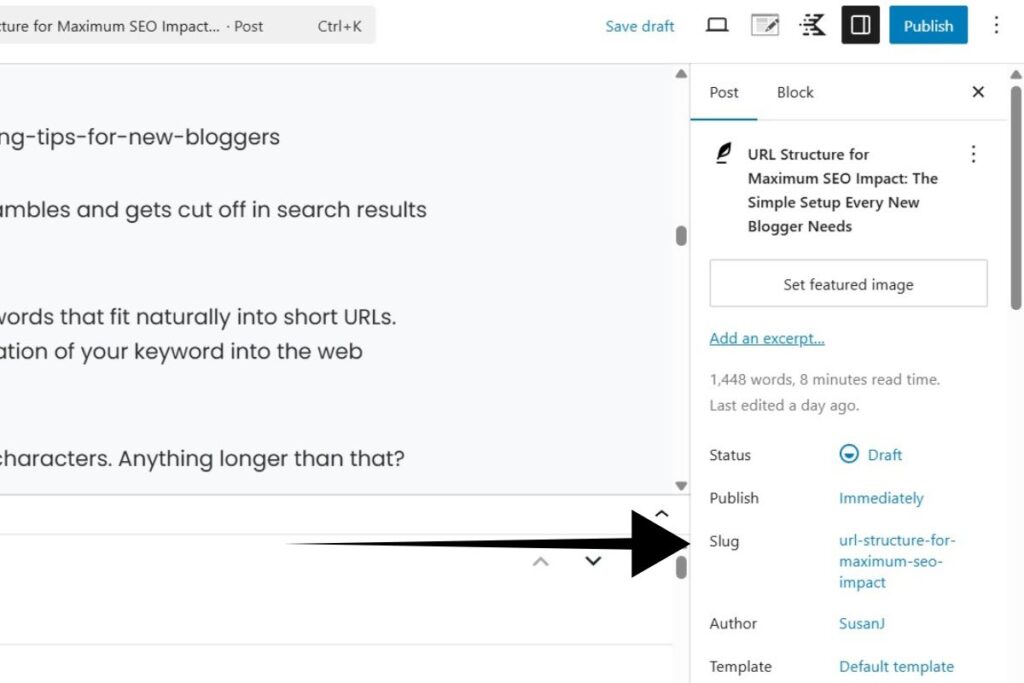
- In the WordPress block editor, look at the right sidebar.
- Make sure you’re on the “Post” tab at the top.
- Scroll down and you’ll see “Slug” with your URL showing underneath it.
- Click on that URL and you can edit it to whatever you want.
Make it short, include your main keyword, and make sure it actually describes what the post is about.
This is slug optimization, which is just a fancy term for “make your URL make sense to humans and search engines.”
Should I Put Dates in My URLs?
No. Skip the dates completely.
Many new bloggers do this and don’t even realize it’s happening and that they can change it. Their URL structure has dates built in, so every post looks like: /2024/12/post-title
Don’t do this to yourself.
First, it makes your content look outdated immediately. Even if you update the post every single year, that “/2024/” is still sitting there making it look old to anyone who sees the link.
Second, URLs with dates take up valuable space for no good reason. You want short URLs that focus on your keyword, not random date information.
The only time numbers make sense is when they’re actually part of your content. If you’re writing “7 WordPress Plugins Every Blogger Needs,” then /7-wordpress-plugins makes total sense because the number is the whole point.
But dates? Those hurt your URL more than they help.
What Keywords Should Go in My URLs?
Your main keyword should definitely be in your URL. That’s basic keyword placement for SEO.
But don’t try to stuff every variation of your keyword in there. That’s keyword stuffing and it looks spammy to both Google and readers.
If your post is about email marketing for bloggers, your URL could be:
/email-marketing-bloggers
You don’t need this mess:
/email-marketing-tips-strategies-tactics-bloggers-beginners-complete-guide
As you’re doing keyword research before you start the actual writing, think about how that keyword will fit into a short URL. If your target keyword phrase is super long, you might need to shorten it for the URL while keeping the full phrase in your title and content.
Your goal is keyword-rich URLs that still sound natural. Your URL should make sense if you said it out loud to someone.
This is part of your overall SEO strategy. URLs work together with your content, your meta descriptions, and your internal linking to help Google understand what you’re writing about.
How Long Should My URLs Be?
As short as possible while still being clear about your topic.
Aim for 3-5 words maximum in your slug. Anything longer gets cut off in Google search results anyway, so what’s the point?
Google only shows about 60 characters of a URL in search results. If your URL is longer than that, people searching can’t even see the whole thing. They just see your domain name and the beginning of your slug before it cuts off with “…”
Short URLs are also way easier for people to remember and type if they need to share your link.
URL length matters for user experience too. Nobody wants to copy and paste a URL that’s basically an entire sentence.
I’ve seen bloggers with URLs that go on forever. Don’t be that person. Keep it tight and focused.
Do I Need Categories or Tags in My URLs?
No. You don’t need categories or tags in your URLs. Keep your URL hierarchy simple.
Some WordPress themes or old tutorials might tell you to include category names in your URLs. So your URLs would look like: /blogging-tips/wordpress-plugins
Skip that approach.
Category-based URLs create unnecessary URL path complexity. What happens when you want to change a post’s category later? Your URL would need to change too, which creates a whole mess.
Simpler is better. Your domain name plus a short, keyword-focused slug gives you the cleanest URL structure possible.
This also gives you better URL consistency across your entire blog. Every post follows the same pattern, which makes everything easier to manage as you grow.
What About Special Characters or Symbols?
Don’t use them in your URLs. Period.
Stick to lowercase letters, numbers, and hyphens. That’s it.
No ampersands (&), no apostrophes (‘), no exclamation points (!), no question marks (?), no percent signs (%), no quotation marks.
WordPress will usually strip these out automatically, but sometimes weird things happen with URL parameters that can mess up your links.
Special characters can also cause problems when people try to share your links on social media or in emails. The link might break or look weird.
Keep your URL naming conventions simple and predictable. Letters, numbers, hyphens. Done.

URL Structure for Maximum SEO Impact: Your Simple Action Plan
Here’s what you actually need to remember about URL structure for maximum SEO impact.
Set your WordPress permalinks to “Post name” before you publish your first post. This creates clean, SEO-friendly URLs that include only your domain and your slug.
Do this once and you’re set.
Every time you write a post, edit the automatically generated URL in the sidebar to make it shorter and more focused. This takes maybe 10 seconds per post and makes a real difference for SEO performance.
Skip dates, skip category names, and skip all the extra stuff. Just domain name plus a short, keyword-focused description of your post.
Use hyphens between words and keep everything lowercase. No special characters, no weird symbols.
Include your main keyword but don’t stuff multiple variations in there.
That’s honestly it. Good URL optimization doesn’t require fancy tools or technical skills. It’s common sense and consistency.
URLs are just one piece of your SEO so use an on-page SEO checklist to keep you on track.
When you combine clean URLs with solid internal linking, optimized images, and content that matches search intent, you’re building a strong foundation.
Think of URL structure for maximum SEO impact as part of your foundation. Get this piece right from day one, and you’re building your foundation on solid ground for everything else you’ll do to grow your blog.
Frequently Asked Questions
What exactly is a URL slug? The slug is the end part of your URL after your domain name. In “yourblog.com/blog-post-title,” the slug is “blog-post-title.” That’s the part you edit for each post in the right sidebar of WordPress.
Can I change a URL after I publish a post? Technically yes, but it can mess with your search rankings and any links pointing to that post. Much better to get it right the first time before you hit publish.
Do I need to include every keyword in my URL? No. Just your main keyword is enough. Trying to stuff multiple keywords into one URL makes it too long and looks like spam to Google.
Should my URL match my title exactly? No. Your title can be longer and more detailed to attract clicks. Your URL should be a shortened version that captures the main point in 3-5 words.
Does URL structure really matter for SEO? Yes. It’s not the most important ranking factor, but it’s one signal Google uses to understand your content. Clean, keyword-focused URLs definitely help with search engine ranking over time.